LLMs are stateless by design — every time you press Send, the model starts from a blank slate. When it lacks past interactions, domain facts, or user preferences, it can only guess at the bigger picture, producing answers that feel generic or even contradictory from turn to turn. Persistent memory solves this problem by:
Preserving short-term continuity - a rolling buffer of the current conversation keeps the model from re-asking questions it already “heard.”
Holding long-term knowledge - facts, policies, and prior decisions stay available across sessions, turning a reactive chatbot into a proactive collaborator.
Personalising responses - episodic, semantic, and procedural memories let the AI adapt to individual users and multi-step workflows instead of delivering one-size-fits-all output.
Without this layered memory architecture, even the smartest model repeats itself, forgets goals, and forces you to copy-paste context manually. With it, AI can reason over time, reference earlier work, and finish complex tasks without starting from zero.
Alchemyst turns the abstract idea of “AI memory” into a drop-in reality for any web-based LLM:
Automated capture & classification - a single shortcut lets you save any snippet as long-lived Memory or task-scoped Context; no manual prompt-stuffing.
Intelligent context manager - before you submit a prompt, Alchemyst filters, trims, and formats only the relevant pieces so you stay within token budgets while still giving each model exactly what it needs.
Model-agnostic injection - the same memory layer follows you from ChatGPT to Claude to Gemini, eliminating tab-hopping and preventing “context drift.”
Enterprise-grade security - all data is AES-256-encrypted on-device, with optional end-to-end-encrypted cloud sync and full audit trails.
Bring Alchemyst AI’s memory directly into your AI model such as chatGPT, claude using our Chrome extension. This extension seamlessly connects AI model with your Alchemyst AI account, letting your assistant remember context you add across chats.
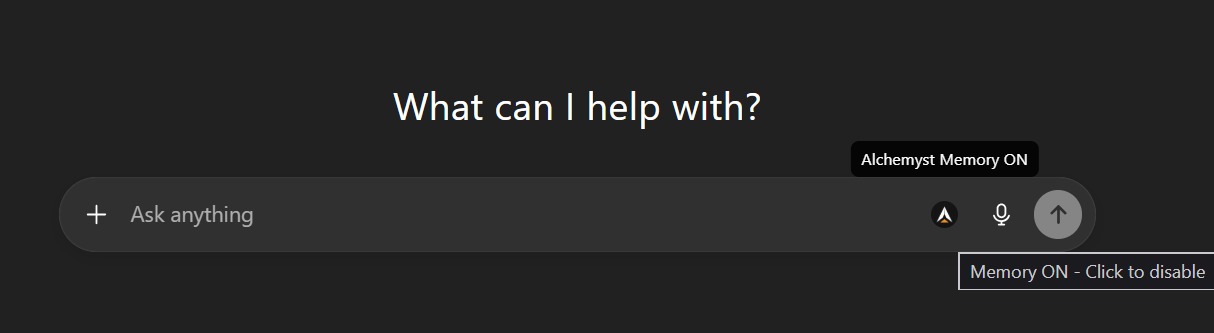
After entering your key, look for the Alchemyst AI memory toggle icon inside the message box.
Flip the switch to ON - and that’s it!Your Chat sessions will now be enhanced with Alchemyst AI’s memory - preserving important context across conversations.
Example view of the memory toggle icon in ChatGPT.